📑Table of Contents:
- Can You Recover a Deleted Twitter Account?
- How Do You Recover a Deleted X Account?
- How Long Do You Have to Recover a Deleted Twitter Account?
- Can You Recover a Twitter Account After 30 Days?
- Can You Get Your Old Twitter Username Back?
- What If You Forgot Your Twitter Password?
- What If Your Account Was Hacked and Then Deleted?
- Is a Suspended Twitter Account the Same as a Deleted Account?
- Will Your Followers and Posts Return After Reactivation?
- Can You Recover Your Twitter Data After Permanent Deletion?
- How Can You Avoid Losing an X Account Permanently?
- Can You Recover a Deleted Twitter Account? Final Answer
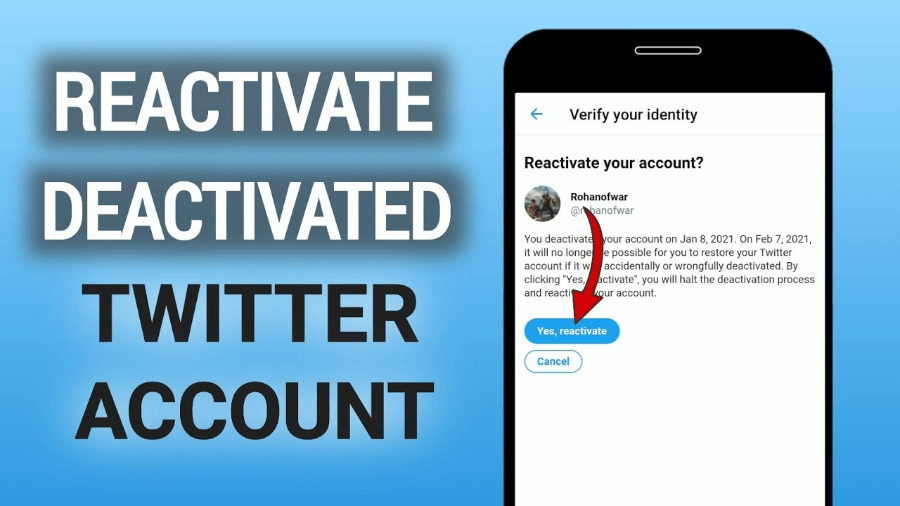
Can you recover a deleted Twitter account? In many cases, yes—but only if the account is still within X’s 30-day deactivation period. When you delete an X account (formerly Twitter), the platform doesn’t remove it permanently right away. Instead, X first deactivates the account and gives you 30 days to change your mind.
However, once those 30 days pass without a successful login, X permanently deletes the account. At that point, you cannot normally restore the old profile, posts, followers, likes, or account history.
Therefore, timing matters more than anything else. If you recently deleted your Twitter account and want it back, try to reactivate it immediately rather than waiting until the end of the recovery period.
Can You Recover a Deleted Twitter Account?
Yes, you can recover a Twitter or X account if fewer than 30 days have passed since you deactivated it.
X treats account deletion as a two-stage process. First, you deactivate your profile. Then, a 30-day waiting period begins.
During that time, your profile and username disappear from normal public viewing. However, X keeps enough account information available to let you return.
As a result, logging back in during the 30-day window usually cancels the deletion process and restores the account.
After 30 days, however, X says you can’t reactivate the previous account
How Do You Recover a Deleted X Account?
If your account is still within the 30-day recovery period, the process is relatively simple.
First, open X.com or the X app on your phone. Next, enter the username, email address, and password associated with the deactivated account.
X should then display a message asking whether you want to reactivate the account.
Confirm the reactivation, and X will take you back to your timeline.
The Basic Steps Are:
- Open X.com or the X mobile app.
- Enter your old username or email address.
- Enter your password.
- Confirm that you want to reactivate the account.
- Wait for your profile information to return.
However, don’t panic if everything doesn’t appear immediately.
Your posts, followers, following count, and likes may need time to repopulate. In some cases, account statistics can take roughly a day to return to normal.
How Long Do You Have to Recover a Deleted Twitter Account?
X currently gives you 30 days from the deactivation date.
Therefore, if you deactivated an account on August 1, you should reactivate it before the 30-day period expires.
Don’t wait until the final hours. Login problems, forgotten passwords, email-access issues, or temporary reactivation errors could prevent you from completing the process in time.
Moreover, X specifically advises users experiencing reactivation problems near the deadline to contact support.
Consequently, recovering the account as early as possible provides the safest approach.
Can You Recover a Twitter Account After 30 Days?
Generally, no.
Once the 30-day deactivation period expires, X permanently deletes the account. According to X’s current help information, you cannot reactivate the previous profile after that point.
Additionally, you lose access to the old posts through the account itself.
You can create a new X account, but it won’t restore the old follower list, likes, posts, Direct Messages, or original account history.
Therefore, creating a new account and recovering the old account are two very different things.
Can You Get Your Old Twitter Username Back?
Possibly, but the answer depends on timing and availability.
During the 30-day deactivation period, X keeps your username tied to the deactivated account. This restriction helps preserve your ability to reactivate it.
After the account becomes permanently deleted, however, X may make that username available for registration by another account.
As a result, someone else could eventually claim your old handle.
If the username remains available, you may register it on a new account. However, getting the same handle does not restore the original account.
Instead, you create a new profile using the old name.
What If You Forgot Your Twitter Password?
A forgotten password does not necessarily prevent account recovery.
If you still have access to the email address or phone number connected to your account, use X’s password-reset process.
You can generally start a reset using your username, email address, or phone number. Then, X sends a verification code through an available recovery method.
After setting a new password, try logging into the deactivated account again.
However, the 30-day deadline still applies. Therefore, start password recovery as soon as possible.
If you have lost access to both your email and phone number, recovery becomes more difficult. In some cases, X Support may help, but don’t assume support can restore an account after permanent deletion.
What If Your Account Was Hacked and Then Deleted?
A hacked account requires a different approach.
For example, an attacker might gain access to your account, change the password, alter the email address, and deactivate the profile.
In that situation, contact X through its compromised-account support process as soon as possible.
Also, secure the email account associated with X, because control of your email can let an attacker access password resets.
If you still have account access, change your password immediately and remove any unfamiliar third-party applications.
Moreover, X advises users to review unexpected posts, Direct Messages, follows, blocks, and other actions that could indicate unauthorized access.
Time matters here as well. If a hacker deactivated the account, the same 30-day reactivation window can become critical.
Is a Suspended Twitter Account the Same as a Deleted Account?
No.
A suspended account has not necessarily entered the deletion process.
X may suspend an account because of suspected rule violations, spam, security problems, impersonation, abusive behavior, or other enforcement issues.
Therefore, trying to reactivate a suspended account as though you voluntarily deleted it will not solve the problem.
Instead, log in and follow any verification instructions X displays. If you believe X suspended the account incorrectly, you can submit an appeal.
Similarly, a locked or limited account differs from a deleted one. X may ask you to verify an email address, add a phone number, reset a password, or complete another security step before restoring full access.
Will Your Followers and Posts Return After Reactivation?
Usually, yes, if you reactivate within the allowed period.
However, account information may not return instantly.
For example, your follower count might initially look lower than before. Likewise, posts, likes, or other numbers may need time to repopulate.
Therefore, give the system some time after reactivation.
If important account statistics still look incorrect after roughly 48 hours, X recommends contacting support.
Most importantly, avoid deleting or recreating content immediately, assuming it has disappeared permanently.
Can You Recover Your Twitter Data After Permanent Deletion?
Recovering the actual X account after permanent deletion is not normally possible.
However, copies of individual content may still exist elsewhere.
For example, you might have previously downloaded your X data archive. Screenshots, browser history, search-engine results, quoted posts, or web archives may also preserve pieces of old content.
Still, these copies do not restore your X account.
Therefore, if preserving your history matters, download an archive before deactivating. X allows logged-in users to request an archive containing information associated with their accounts.
How Can You Avoid Losing an X Account Permanently?
The easiest solution is preparation.
Before deactivating an important account, make sure you know the password and still control the associated email address and phone number.
Additionally, download your account archive if you want a personal copy of your posting history.
You Should Also:
- Keep your account email current.
- Use a strong, unique password.
- Enable available account-security features.
- Save important photos and videos separately.
- Keep copies of important posts.
- Remove unknown third-party app access.
- Reactivate well before the 30-day deadline if you change your mind.
Also, remember that logging back into a deactivated account can restart access, so make sure you truly want to delete it before you begin.

Can You Recover a Deleted Twitter Account? Final Answer
Yes, you can recover a deleted Twitter account if it’s still within X’s 30-day deactivation window.
Log into X with the account credentials and confirm that you want to reactivate it. Your posts, followers, likes, and other account information may take some time to reappear.
However, after more than 30 days, X says the account is permanently deleted and cannot be reactivated. You may create a new account afterward, and you may even reclaim the old username if nobody else has taken it, but the new profile will not contain the old account’s history.
Therefore, if you regret deleting your Twitter or X account, act quickly. The sooner you try reactivation, password recovery, or contacting support, the better your chances of getting the original account back.